

Flutter, Kiro and dash0
Flutter applications as websites in dsah0 - monitoring and observing mobile applications
If you have been following me on the different social channels you might know that I’ve been building a lot of different things
Show the list of my apps
- Nexus Share (how I built it) - https://nexus-share.com, https://app.nexus-share.com (Web + Mobile)
- Train with Joe - https://trainwithjoe.app, https://app.trainwithjoe.app Web + Mobile)
- Pegasus Galaxy - https://pegasus-galaxy.net, https://app.pegasus-galaxy.net (Web + Mobile, not monetised yet)
- Let me ask - https://letmeask.app (Web, not monetised yet)
- Unscratch the world - https://unscratchtheworld.lockhead.cloud/ (Web + Mobile, not monetised yet)
- HC VfL app - https://app.hcvfl.de (Web + Mobile, not monetised)
- TeamCorner - https://teamcorner.app (Web + Mobile, not monetised)
- Porto - https://dev.porto-app.eu, https://app.dev.porto-app.eu (Web + Mobile, not monetised)
- Starlife - https://starlife.lockhead.cloud (Web, not monetised yet)
These applications all share a similar tech stack - depending on the use case. All of them have a baseline of using Angular for the “website” (the landing pages or the web-only versions). The apps that have a mobile application do actually use Flutter as a coding language and thats used for both the mobile application (iOS and Android) and also the web version.
The problem I needed to solve
Now, with all of these different apps that I am building, I need to get into a situation where I am able to monitor and observe the different apps and websites. Otherwise I loose control and oversight over what I do with my apps and websites.
I wanted to get an overview of both my websites (the “landing pages”, the “profile cards”) and the Flutter apps (on web and mobile).
Using dash0 for monitoring, tracing and alerting
One of my good friends - Raphael - has been working at dash0 for a while and thus I decided to try this as a tool to host my Observability stack.
dash0 has a web sdk that can be integrated into websites simply - as an npm package - but when I tried to use that in my Flutter applications it didn’t collect the required, detailed telemetry information.
What do we do in 2026 if we face these problems? Right, we hand that out to our personal coding agent…
Building something with Kiro (Web)
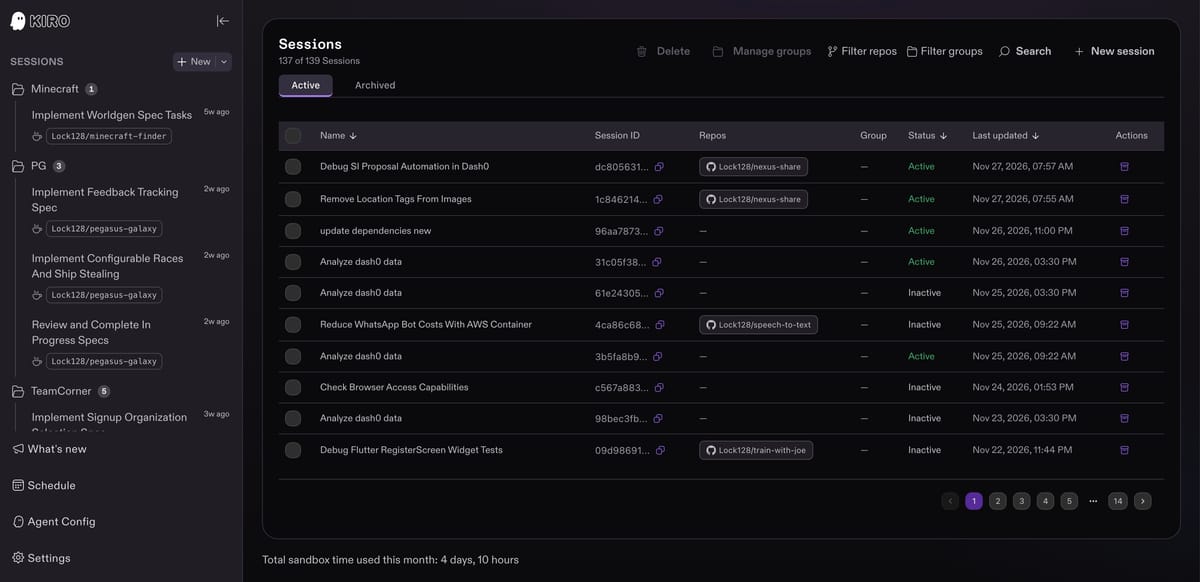
So, I started the journey of building this and I started this off with a very simple prompt to Kiro Web.
if you check out nexus-share we are using flutterrific_opentelemetry: ^0.4.0 to emit otel opentelemetry data to dash0
we now want to build a similar sdk for flutter that follows the implementation of the dash0 web sdk https://github.com/dash0hq/dash0-sdk-web
please read and understand the SDK and then build the SDK in the flutter-dash0-sdk repository, ideally then also enable that for nexus-share
Believe it or not, it worked out pretty well and Kiro created this Flutter SDK for me:
https://github.com/Lock128/flutter-dash0-sdk
Of course, the simple prompt didn’t perfectly implement all required features, it missed out on adding the correct OS for mobile applications, the correct service information and user details - but that was to be expected because my prompt was really bad.
Enbling it for seven applications
This enables and allows me to now monitor all of my Flutter applications. I needed to roll this out to all of my repositoryies - and obviously I did use Kiro Web again to get this done.
We recentlly introduced the flutter-dash0-sdk for nexus-share
we now want to make sure. that the other flutter apps that we have also use that SDK to report telemetry data, some of them will need some set up too (eg secrets, data sets, credentials, etc)
Please also check out the opentelemetry skills here: https://github.com/dash0hq/agent-skills/tree/main/skills
i would hope to get a PR for each application that includes the usage of the SDK, potentiall other OpenTelemetry related changes and a “SETUP_OTEL” markdown file with tailored actions required for the relevant application
This whole implementation for all repositories used
Est. Credits Used: 55.35
Elapsed Time: 46m 59s
And also the dash0 web SDK for all of my angular apps as done quickly
can you enable the dash0 web sdk for all of the “join_page” and “profile_cards” angular web applications in all of these projects?
See docs here - https://github.com/dash0hq/dash0-sdk-web
reuse the existing environment variables and dataset names for deployment
This was even faster and used less credit
Est. Credits Used: 9.11
Elapsed Time: 6m 5s
With that, I can now get all of the required logs, metrics and traces in dash0 for all of my applications within dash0 and the Flutter applications show up as “websites” in dash0.
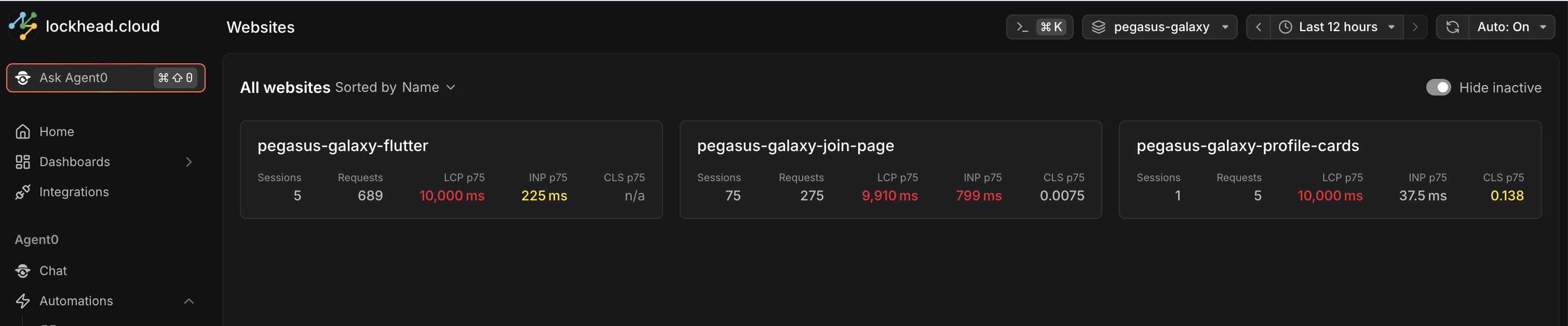
Dear dash0 product team: please allow me to see this as “mobile apps” aswell and/or call this “applications” - based on the user agent, I should then be able to also visualize the different users and sessions - and potentially also get cross-device user sessions tracked ;)
This is not the end - automating the analysis or the data
Now, this is obviously not where this ends.
Having all of the observability data in one places and having the possibility to connect Kiro Web to dash0 using their MCP server (I actually tried out dash0’s own Agent0, but to be honest, it costs WAAAAAAY to much to use it!), gave me the possbility to set up an automation in Kiro web:
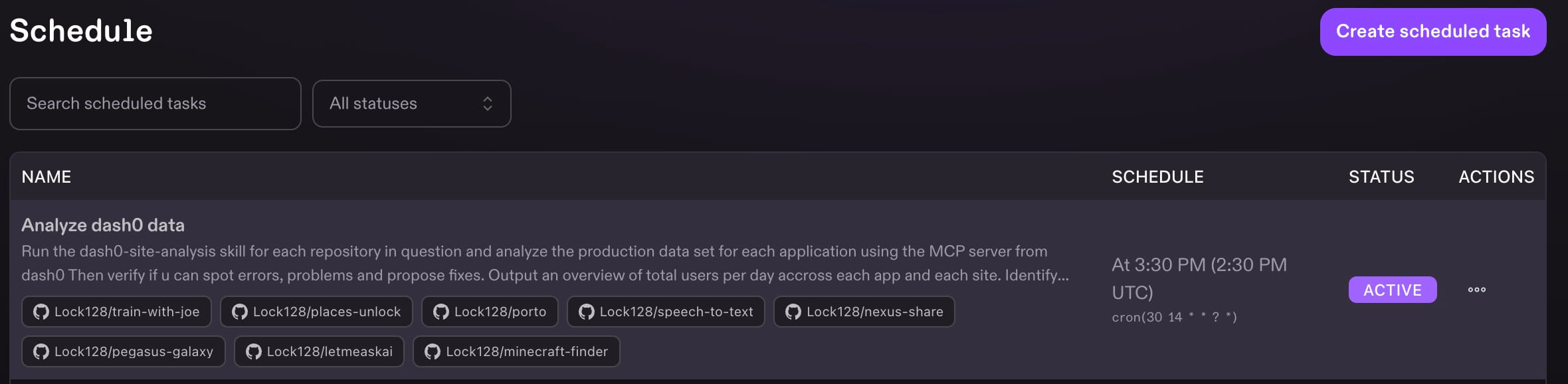
And what this means for me is that once per day I get this automation started:
Repositories
------------

This automation is configured to work with the following repositories:

  - Lock128/train-with-joe
  - Lock128/places-unlock
  - Lock128/porto
  - Lock128/speech-to-text
  - Lock128/nexus-share
  - Lock128/pegasus-galaxy
  - Lock128/letmeaskai
  - Lock128/minecraft-finder

Task
----

Run the dash0-site-analysis skill for each repository in question and analyze the production data set for each application using the MCP server from dash0

Then verify if u can spot errors, problems and propose fixes.

Output an overview of total users per day accross each app and each site.

Identify trends and other notable things
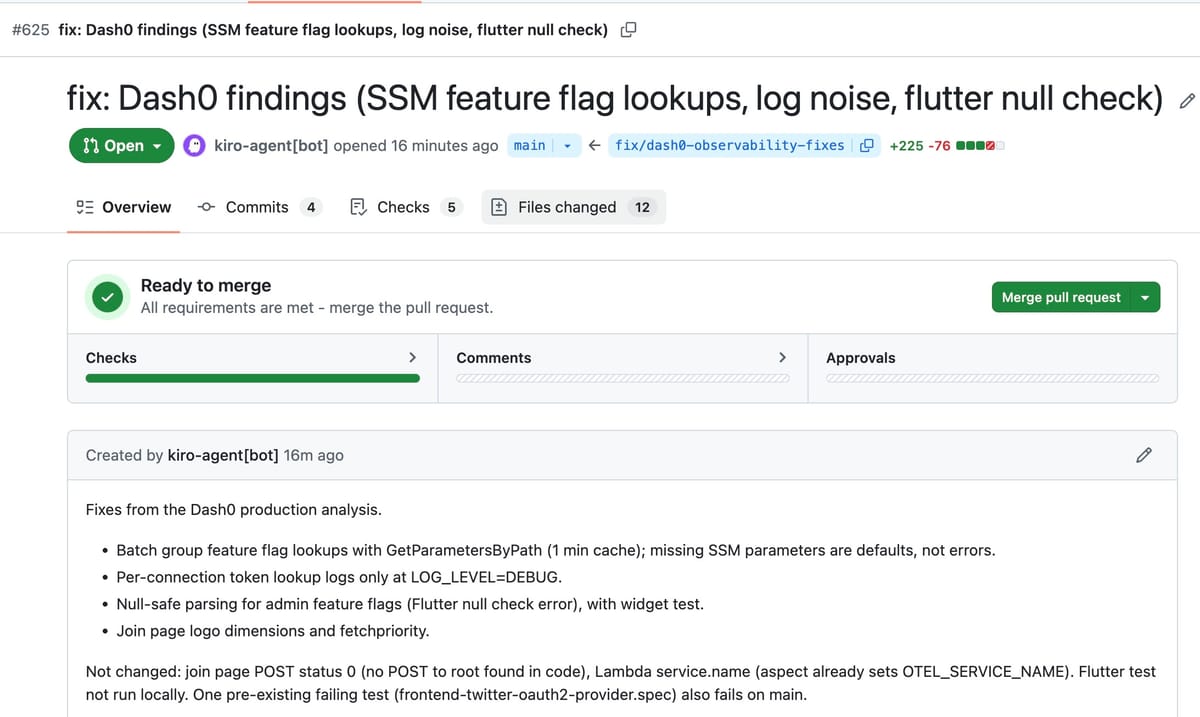
And just like that, my applications improve themselves and the only thing I need to do is to merge these Pull Requests created by Kiro.
What are you using to observe the applications or SaaS you build? I’d love to hear — reach out to me on LinkedIn or through my contact form.